EasyLog
A multi-log analyzer with a dedicated dashboard for every log type.
EasyLog ingests logs over syslog, parses each source by type, stores the parsed events in an embedded DuckDB column store, and serves a live dashboard per log type — all from a single, self-contained binary. Instead of a wall of raw text, you get clear metrics, charts, and drill-down tailored to each source.
Architecture
graph TD
    A["Log sources (Apache, Nginx, Traefik …)"] -->|"rsyslog → syslog UDP/TCP :514"| B["EasyLog ingest engine (Rust / Axum)"]
    B -->|"route by source IP"| C{"Log type"}
    C -->|apache| D["Apache parser"]
    C -->|nginx| E["Nginx parser"]
    C -->|traefik| F["Traefik JSON parser"]
    D --> G[("DuckDB (columnar store)")]
    E --> G
    F --> G
    G -->|"live SQL aggregations"| H["Per-type dashboards · Web UI :3000"]
Incoming syslog messages are routed to a parser by the sending host's IP, which you map to a log type in the web UI. Parsed events are stored as rows — the source of truth — and every dashboard is a live SQL query over them, so you can always drill down to the underlying requests.
Features
- Syslog ingestion over both UDP and TCP (RFC 3164 & RFC 5424).
- Pluggable log types — each type owns its parser, storage schema, and dashboard.
- DuckDB storage — parsed events stored as rows; dashboards run live analytical SQL, so new views never need a re-ingest.
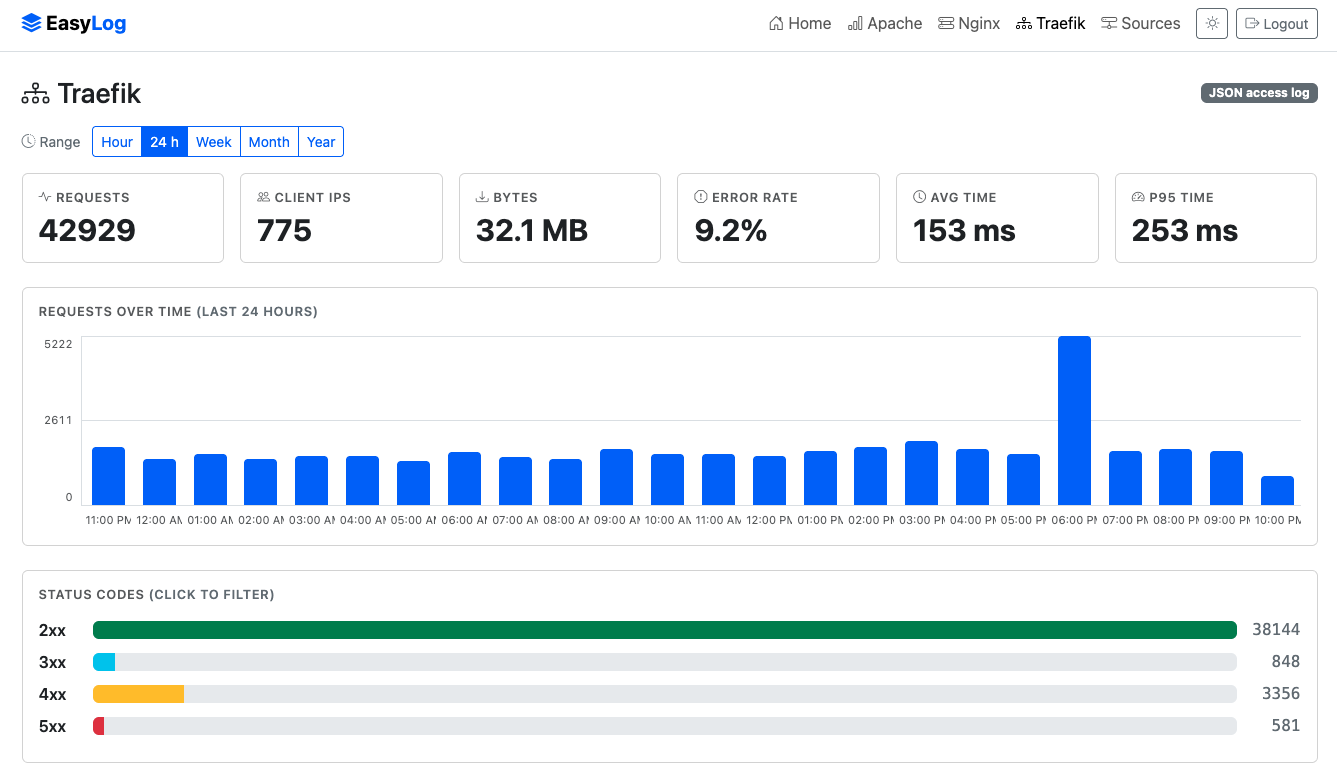
- A dashboard per log type — KPI cards, a requests timeline, status-code breakdowns, and top-N tables, with click-to-filter drill-down and a time-range selector (hour / 24h / week / month / year).
- Overview home page — cross-type KPIs (total logs, logs/min) and pie charts by source and by type.
- Authentication — admin account created on first run; the web UI is login-protected. Syslog ingestion stays open.
- Single self-contained binary — templates and assets are compiled in; nothing to install alongside it. Light/dark theme, fully offline (no CDN).
- First-class packaging —
.deband.rpmfor x86_64 and arm64, with a systemd unit.
Supported log types
| Log source | Format | Dashboard highlights |
|---|---|---|
| Apache HTTPD | Common / Combined | Requests, status codes, top URLs & client IPs |
| Nginx | Combined access log | Requests, status codes, top URLs & client IPs |
| Traefik | JSON access log | The above plus top routers/services and avg & p95 request duration |
Adding more types is by design
A new log type is a self-contained module (parser + storage + dashboard). Apache and Nginx share the same combined-format engine; Traefik adds router/service/duration panels on top.
Installation
Download the .deb or .rpm for your architecture from the releases page, then:
The package installs the binary to /usr/bin/easylog, a default config to /etc/easylog/easylog.toml, and a systemd unit; the database lives in /var/lib/easylog. The service runs as root (standard for a syslog collector binding port 514).
Then open http://<host>:3000/ — on first run you'll be prompted to create the admin account, after which the UI requires login.
Configuration
EasyLog reads /etc/easylog/easylog.toml (override the path with the EASYLOG_CONFIG environment variable):
syslog_bind = "0.0.0.0"   # address the UDP + TCP listeners bind to
syslog_port = 514         # standard syslog; use 5514 to run without privileges
web_port    = 3000        # web UI / dashboards
db_path     = "/var/lib/easylog/easylog.duckdb"
Note
Log sources are not configured here — they're managed in the web UI (next section), so you never have to edit and reload a file to add a host.
Sending logs to EasyLog
There are two steps: tell EasyLog which host sends which log type, then forward the logs.
1. Register the source
In the web UI, open Sources (/sources) and add the sending host's IP address with its log type (apache, nginx, or traefik). EasyLog routes incoming syslog by source IP — traffic from unregistered hosts is dropped.
2. Forward the logs
Point the host's log file at EasyLog's syslog port with rsyslog's imfile module. Polling mode is recommended for reliability inside containers.
/etc/rsyslog.d/60-easylog.conf on the web server:
module(load="imfile" mode="polling" pollingInterval="2")

input(type="imfile"
      File="/var/log/apache2/access.log"   # nginx: /var/log/nginx/access.log
      Tag="apache"
      ruleset="easylog_forward")

ruleset(name="easylog_forward") {
    action(type="omfwd" target="EASYLOG_IP" port="514"
           protocol="udp" template="RSYSLOG_ForwardFormat")
}
Apply and restart:
Log format & reverse proxies
EasyLog parses both Common and Combined access-log formats — Nginx's default combined and Apache's combined/common all work out of the box. If a host sits behind a reverse proxy, configure it to log the real client IP (e.g. mod_remoteip / X-Forwarded-For) so the dashboards show visitors rather than the proxy.
Dashboards
Each log type has its own dashboard, and the home page rolls everything up:
- KPI cards — requests, unique client IPs, bytes served, error rate (and avg/p95 duration for Traefik).
- Requests over time — a zero-filled timeline that spans the whole selected range, shown in your browser's local timezone.
- Status codes — 2xx / 3xx / 4xx / 5xx breakdown; click a class to filter.
- Top URLs & client IPs (and routers / services for Traefik) — click any row to filter the whole dashboard. Filters stack and are shareable by URL.
Use the time-range buttons (Hour · 24h · Week · Month · Year) to bound everything, and click chart elements to drill in — the URL captures the active filters, so views are bookmarkable.
Why EasyLog
- Memory-safe core — written in Rust on the Axum framework for speed and safety.
- No heavy database — DuckDB is embedded; there's no separate server to run, yet it's built for fast aggregation over millions of rows.
- Operationally simple — one binary, one config file, systemd-managed, packaged for the Debian and RHEL families on both x86_64 and arm64.